
Learning Go in 2026: Should I Even Bother Without AI?
Is learning a new language the hard way still worth it in the age of AI? I'm forcing myself to code without Copilot to find out.

I'm starting to learn Go. And honestly? I'm not sure if I'm doing this the "right" way anymore.
Quick context: I'm not new to programming - I know other languages and have been coding for a while. But Go is new territory for me, and I'm using this as an experiment in how to learn a new language in the age of AI. This isn't a "beginner learns to code" story; it's about developing muscle memory and deep understanding in a new language without becoming dependent on AI.
The Question That Won't Leave Me Alone
Here's the thing: it's 2026. I can literally ask Claude or ChatGPT to write an entire web server in Go, explain every line, debug my code, and even refactor it to be more idiomatic. So why am I sitting here, staring at compiler errors, trying to figure out why my goroutines aren't working the way I expected?
Am I wasting my time? Should I just embrace AI and move faster? Or is there something important I'll miss if I don't struggle through this myself?
I don't have the answer yet. But I'm documenting this journey anyway.
The Linus Torvalds Effect
Before I dive into the "why Go" question, I need to talk about something that's been rattling around in my head.

I keep thinking about developers like Linus Torvalds, the early Linux kernel contributors, the people who built Unix, the developers who created the languages we use today. These people learned to code with nothing but documentation, man pages, and maybe a book if they were lucky. No Stack Overflow. No YouTube tutorials. Definitely no AI assistant writing code for them.
They sat there, read dense technical documentation, tried things, broke things, and figured it out. And they built... everything. The foundations we all stand on today.
Now, I'm not saying "back in my day" (I'm not even from that era). And I'm not romanticizing the past – learning was probably slower and more frustrating. But there's something about that approach that fascinates me.
They had no choice but to truly understand what they were doing.
When you can't just ask an AI "why isn't my pointer working?" or watch a 10-minute video explaining goroutines, you have to sit with the problem. You read the documentation more carefully. You experiment. You build a mental model of how things work because there's no shortcut.
I wonder if that deeper struggle creates a different kind of programmer. Not necessarily a better one, but someone who thinks about problems differently. Someone who's comfortable not knowing and figuring things out from first principles.
Maybe I'm wrong. Maybe I'm just romanticizing the hard way. But I want to find out for myself.
That's part of why I'm doing this experiment. I want to know what it feels like to learn like those old-school devs did – with just the docs and my own determination. At least for a while.
Why Go? Why Now?
Okay, now let's talk about why Go in the first place.
The practical reasons are obvious: Go runs half the cloud infrastructure we use daily. It's fast, it has amazing concurrency primitives, and companies are hiring for it. Kubernetes, Docker, and countless other tools I use are written in Go.
But the real reason? I'm curious. I've heard developers rave about how Go makes them think differently about code. How its simplicity is actually a feature, not a limitation. How once you "get" Go's philosophy, you write better code in other languages too.
And I want to experience that. Not just have AI explain it to me.
The AI Dilemma: Two Paths Diverge
Let me lay out the two extremes:
Path 1: Learn Without AI
Path 2: Learn With AI
Both paths sound reasonable. Both have merit. And that's the problem.
What Even Is "Muscle Memory" in Programming?
This phrase keeps coming up in my head: "building muscle memory." But what does that actually mean for coding?
For a pianist, muscle memory means your fingers know where to go without thinking. For a programmer, is it knowing how to write a for loop without looking it up? Is it remembering the exact syntax for declaring a slice in Go?
Or is it something deeper? Maybe it's about developing intuition for when something will cause a race condition. Or sensing when your code structure is getting too complex. Or knowing, almost instinctively, which data structure to reach for.
I think the fear is this: if AI does all the typing, all the syntax recall, all the debugging... do I actually learn? Or do I just become good at prompting?
First Things First: Setting Up Your Environment
Before we dive into how I'm learning, if you want to follow along, we need to set up VS Code properly. This is crucial - we're intentionally making coding harder to build better habits.
Step 1: Open Your VS Code Settings
2. Press Ctrl+Shift+P (Windows/Linux) or Cmd+Shift+P (Mac)
3. Type "Preferences: Open User Settings (JSON)"
4. Hit Enter
You should see a JSON file open up.
Step 2: Copy and Paste This Configuration
Replace everything (or merge with your existing settings) with this:
{
  /* ==================== KILL ALL SUGGESTIONS ==================== */
  "editor.quickSuggestions": {
    "comments": "off",
    "strings": "off",
    "other": "off"
  },
  "editor.suggestOnTriggerCharacters": false,
  "editor.acceptSuggestionOnEnter": "off",
  "editor.tabCompletion": "off",
  "editor.inlineSuggest.enabled": false,
  "editor.wordBasedSuggestions": "off",
  "editor.parameterHints.enabled": false,
  "editor.snippetSuggestions": "none",

  /* ==================== BRACKETS & QUOTES (KEEP THESE) ==================== */
  "editor.autoClosingBrackets": "always",
  "editor.autoClosingQuotes": "always",
  "editor.autoClosingDelete": "always",

  /* ==================== NO AUTO-FORMAT ==================== */
  "editor.formatOnSave": false,
  "editor.formatOnPaste": false,
  "editor.formatOnType": false,
  "editor.codeActionsOnSave": {
    "source.fixAll": "never",
    "source.organizeImports": "never"
  },

  /* ==================== GO-SPECIFIC SETTINGS ==================== */
  "go.useLanguageServer": true,
  "go.autocompleteUnimportedPackages": false,
  "go.snippets.enabled": false,
  "go.formatTool": "none",
  "go.formatOnSave": false,
  "go.lintOnSave": "off",
  "go.vetOnSave": "off",

  /* Remove visual hints */
  "go.inlayHints.parameterNames": false,
  "go.inlayHints.functionTypeParameters": false,
  "go.inlayHints.variableTypes": false,
  "editor.codeLens": false,

  /* ==================== KILL ALL AI ASSISTANTS ==================== */
  "github.copilot.enable": false,
  "github.copilot.nextEditSuggestions.enabled": false,
  "amazonQ.enabled": false,
  "tabnine.experimentalAutoImports": false,
  "codeium.enableCodeLens": false,
  "geminicodeassist.inlineSuggestions.enableAuto": false
}
What This Does:
Step 3: Save and Restart
Save the file (Ctrl+S / Cmd+S) and restart VS Code. You should notice immediately - no more suggestions popping up!
Step 4: Verify It's Working
Create a new Go file and start typing. You should see... nothing. No suggestions, no auto-imports, no helpful hints. Just you and a blank canvas.
It'll feel weird at first. Maybe even frustrating. That's the point.
Optional: Make This Go-Specific Only
If you don't want to disable AI for ALL languages, create a workspace settings file:
2. Inside it, create .vscode/settings.json
3. Paste the config above
4. This will only apply to projects in that folder
Now you're ready. Welcome to coding like it's 2005.
My Decision (For Now)
Here's what I've decided to try, at least for this first phase:
I'm learning without AI assistance for the fundamentals.
Not forever. Not for everything. But for now, I want to:
:= and =Why? Because I think there's something valuable in the struggle. Not the struggle for struggle's sake, but because making mistakes and fixing them yourself builds a different kind of understanding than being handed the solution.
But I'm not being dogmatic about it. If I'm truly stuck for hours on something trivial, I'll use AI. If I want to understand a complex concept, I'll ask for explanations. This isn't about proving I'm "hardcore" or rejecting useful tools.
It's about being intentional. About knowing *when* to struggle alone and *when* to ask for help.
How I'm Actually Learning: The Hybrid Approach
Here's my actual system, and it's working better than I expected:
Step 1: Identify What to Learn
I start by listing the core topics I need to cover. For Go, that's been:
Step 2: Generate Drills (Yes, with AI)
Here's where it gets interesting. I use ChatGPT to create practice exercises. I tell it:
*"Give me drills for [topic] from basic to advanced. Small, focused exercises that build muscle memory."*
For example, for generics, I asked for a series of drills starting with the simplest possible generic function and building up complexity.
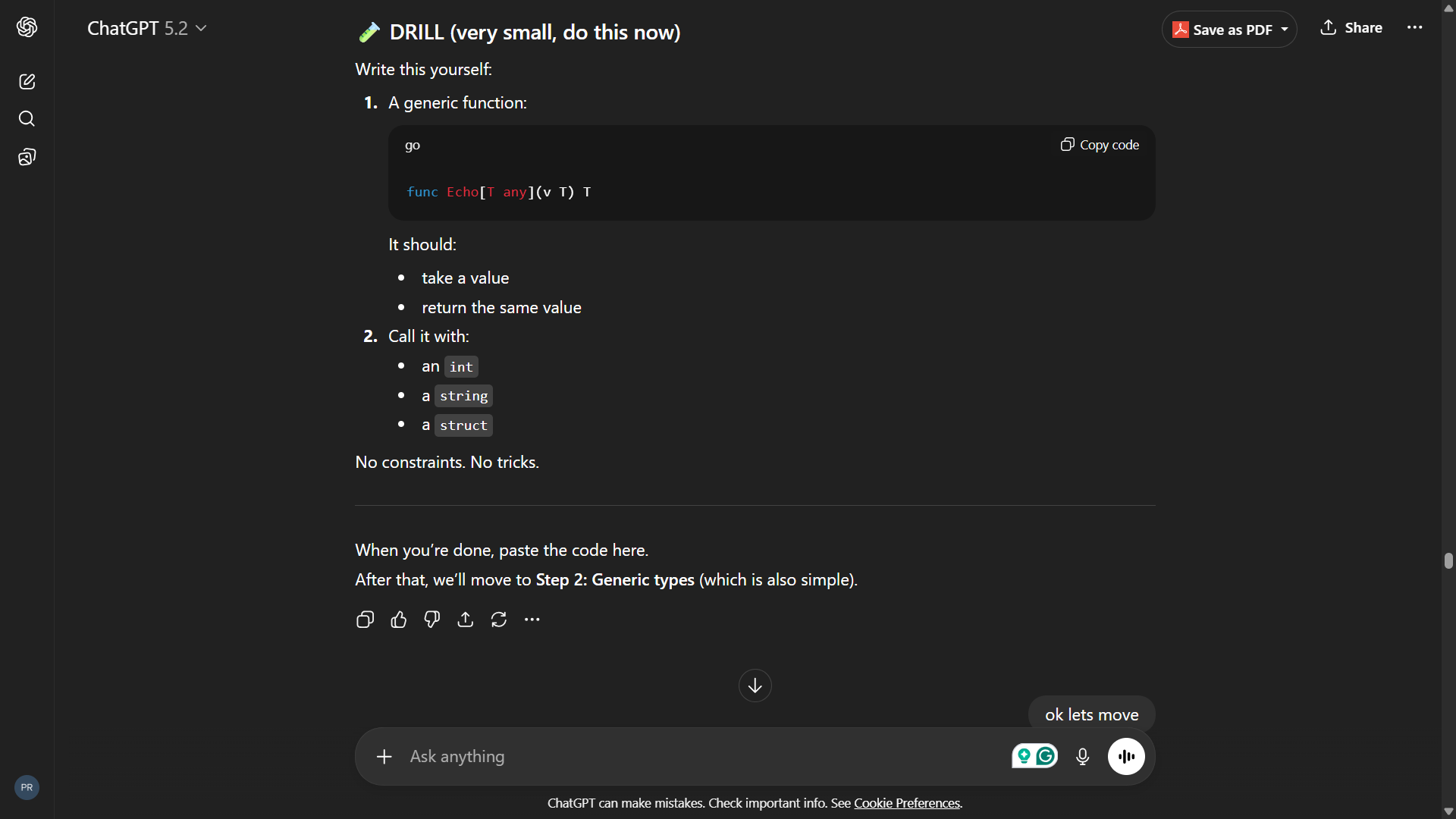
*ChatGPT creates structured drills - from "write a generic Echo function" to more complex scenarios*
The key: AI creates the curriculum, but I do ALL the coding myself.
Step 3: Write Code Without Any Assistance
This is the crucial part. I:
No autocomplete. No suggestions. No "hey AI, why isn't this working?"
Step 4: Verify with AI (But Here's the Twist)
After I've written my solution, I paste it into ChatGPT. But I don't ask "is this right?"
Instead, I say: *"Check this code. If it's wrong, DON'T give me the answer. Tell me what's wrong and how to think about fixing it."*
This is the game-changer. The AI becomes a teaching assistant, not a solution provider.
If my code is correct, it tells me to move to the next drill. If it's wrong, it gives me hints like:
Then I go back and fix it myself.
Step 5: Repeat Until It Clicks
I keep doing drills for each topic until I can write code without constantly checking the docs. Until my fingers remember the syntax. Until I start thinking in Go.
Why This Works
This approach gives me:
It's like having a strict coding instructor who won't give you the answers but will point you in the right direction.
I'm not dependent on AI to write my code, but I'm also not wasting hours stuck on something trivial. It's the middle ground I was looking for.
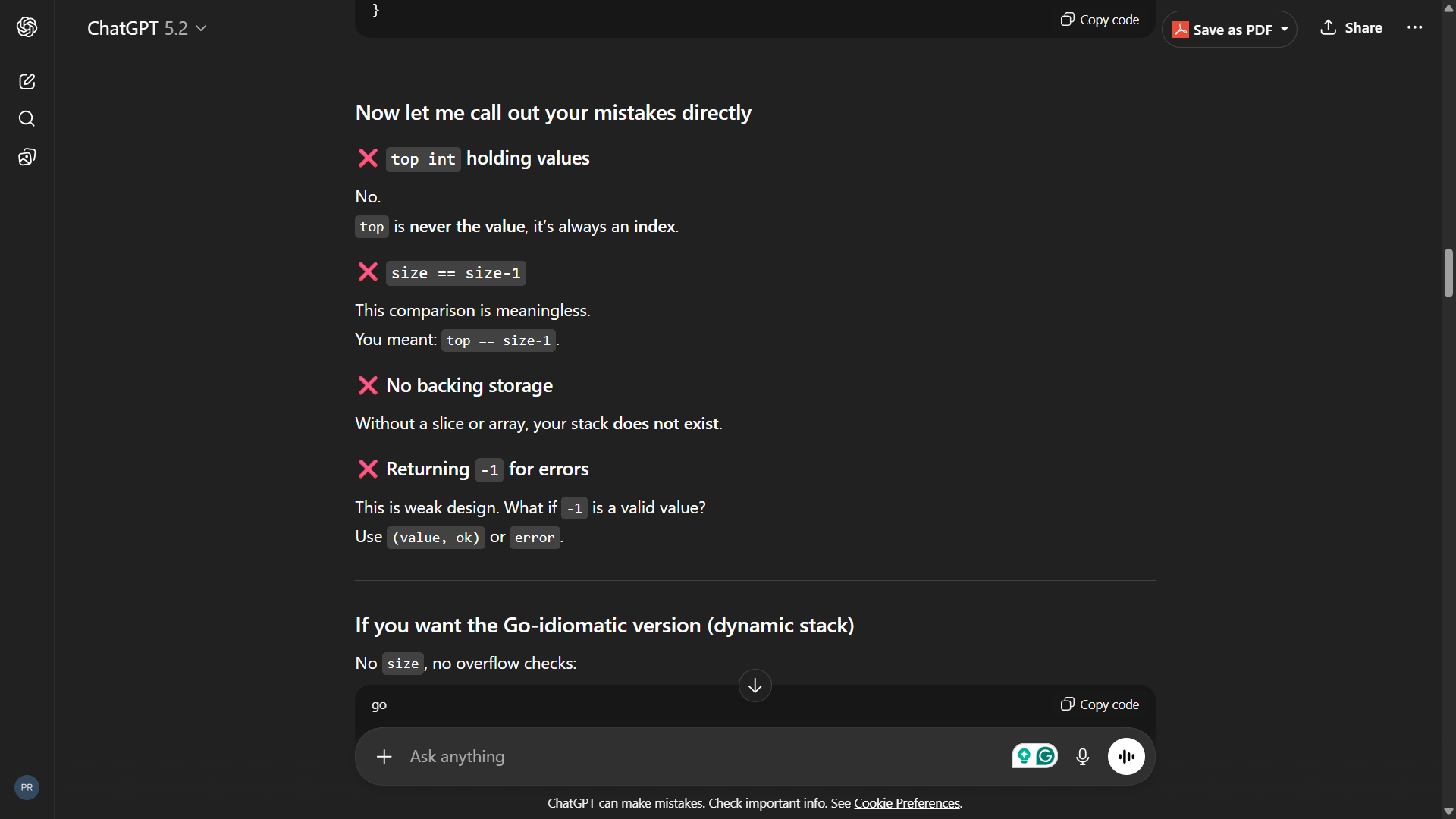
*When my code is wrong, ChatGPT points out the issue but makes me fix it myself*
What I've Learned So Far
I'm just getting started, but here are some early observations - especially coming from C, which is my main point of reference.
Topics I've Covered:
2. Variables and constants (:= vs var vs const)
3. Functions and multiple return values
4. Pointers (they work differently than C!)
5. Structs and methods
6. Slices and arrays
7. Error handling patterns
8. Basic goroutines (just scratching the surface)
All my code and practice drills are on GitHub: github.com/priyanshu-samal/Go
*(If you find it useful, a star would be appreciated - helps me stay motivated! ⭐)*
Go vs C: First Impressions
Coming from C, Go feels familiar yet foreign:
What Feels Familiar:
What's Different (and Weird at First):
1. No pointer arithmetic
In C, I could do ptr++ to move through memory. In Go? Nope. Pointers are safer but less flexible. At first this felt limiting, now it feels... responsible?
2. Multiple return values
value, err := someFunction()
This is EVERYWHERE in Go. In C, I'd use output parameters or return codes. Go's approach is cleaner but took getting used to.
3. No header files
Wait, what? Where do I declare things? Turns out, Go just... figures it out. Capital letter = exported, lowercase = private. That's it. My C brain finds this both liberating and slightly unsettling.
4. Garbage collection
I don't manually manage memory? But... but that's half of C programming! Go has GC, which means fewer segfaults but also less control. Still adjusting to this mentally.
5. Error handling is verbose
if err != nil {
    return err
}
I write this a million times. In C, I'd probably just return -1 and move on. Go *forces* you to think about errors. Annoying but probably good for me.
6. Slices vs Arrays
Go has both arrays (fixed size) and slices (dynamic). This is way more convenient than C's manual memory management for dynamic arrays. append() just works. No more realloc() nightmares.
The Biggest Mindshift:
Go feels like "C for people who want to get things done." It keeps the performance and directness of C but adds conveniences like garbage collection, built-in strings, and a sane package system.
Also, compilation is FAST. Like, shockingly fast compared to C++ builds I'm used to.
What I'm Still Wrapping My Head Around:
The compiler is my frenemy. Go's compiler is strict. Really strict. Unused variables? Compilation error. Unused imports? Error. Coming from C where the compiler would just warn you, this was jarring. But I'm starting to see it as a teaching tool - it won't let me write sloppy code.
Goroutines are magic (and confusing). In C, if I wanted concurrency, I'd use pthreads - lots of boilerplate, manual synchronization, easy to mess up. In Go? go doSomething() and... it just works? I'm suspicious. This feels too easy, which means I definitely don't understand them yet.
Interfaces are implicit. No implements keyword. If your type has the right methods, it satisfies the interface. Coming from explicit C-style thinking, this feels like black magic. How does the compiler know? (Okay, I know how, but it still feels weird.)
I miss my AI copilot already. Not gonna lie, typing everything myself is slower. I miss autocomplete that actually understands context. I miss being able to ask "why isn't this working?" and getting an instant answer.
But I'm also noticing things I might have skipped past. Small details in the documentation. Error messages that actually teach me something when I read them carefully. The muscle memory is slowly building - I'm reaching for syntax less and less.
The Experiment Continues
This is edition #1 of what I hope will be many posts. I don't know where this journey goes. Maybe in a month, I'll conclude that learning without AI was a waste of time. Maybe I'll discover that the struggle was exactly what I needed.
Maybe the answer isn't binary at all.
Want to follow my progress?
Check out my GitHub repo where I'm documenting everything: github.com/priyanshu-samal/Go
You'll find:
Feel free to star the repo if you find it useful - it keeps me accountable! ⭐
What's next:
And at some point, I'll reintroduce AI into my workflow and see how that changes things. Because let's be real: in professional development, we're all going to be using AI. The question is how to use it without losing the ability to think for ourselves.
Your Thoughts?
If you're learning a new language in 2026, how are you approaching it? Are you embracing AI fully? Going old-school? Finding some middle ground?
I'm genuinely curious. Because I'm figuring this out as I go.
*This is part of an ongoing series documenting my journey learning Go. The journey, the doubts, the discoveries – not a polished tutorial. If you want to follow along, check back for future editions.*
Next: Edition #2 - [Coming soon - Building My First Go Project]
Resources I'm Using
If you want to follow this approach, here are the resources I'm relying on:
Official Documentation:
Videos (When I Need a Mental Break):
Books I'm Planning to Read:
For Drills and Practice:
Note: I'm intentionally NOT using:
The goal is to internalize, not just consume.
A Note to Readers:
I'm not a beginner programmer - I know other languages and coding fundamentals. This is specifically about learning *Go* and developing muscle memory in a new language while being intentional about AI usage.
If you're completely new to programming, this approach might be too hardcore. Start with more guided tutorials first, then come back to this method once you understand the basics.

How a computer actually starts (power button to OS)
→The entire boot process is a strict chain of trust: firmware in ROM → bootloader → kernel → userspace. No magic, just carefully placed code.
Socket.IO Docs Are What Production Documentation Should Look Like
→A breakdown of why the Socket.IO documentation stands out: real scaling guides, honest trade-offs, TypeScript-first thinking, and actual production debugging help.